








Techie Tutorials
Want quick and easy instructions for how to accomplish blog-gy and tech-savvy tasks? Look no further! I have a collection of short videos that walk you right through the process of accomplishing small tasks that make a big difference. Just click on a title to access the video.
Need a specific how-to video for a simple task? Email me at kindercraze@gmail.com and I’ll try to make it the subject of my next tutorial!
Comment Tips for New Bloggers
I’m sure you know the value of leaving a link back to your own blog when
you leave a comment during your blog-stalks. Leaving the web address is
good, but leaving a clickable link is so much
better! If you’ve noticed other bloggers do this and wondered, “How the
heck did she do that?” you can finally be in the know. Learn how to leave a hotlink in a blog comment and discover a few other tricks that will make blog commenting much more interactive and fun!

How to install a favicon – A MUST for all Bloggers
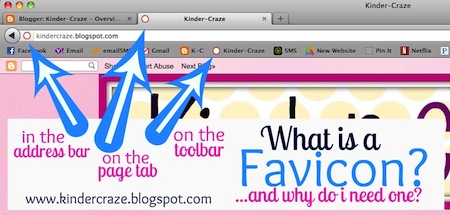
The word favicon is short for “favorite icon”. It’s the little picture
you see next to the name of your favorite blog or website. The favicon image is shown on the page tab when someone views your
blog, in the address bar beside your web address, and on the bookmarks
toolbar (or menu) when someone adds your blog to their list of website
“favorites.” You can easily create and install a favicon to help readers easily identify your blog.

Make an Image Background Transparent (Mac)
Do you ever want to share a great image on your blog or classroom printable that you created, but hate the white box that you see around the image? There is an easy fix to this problem. Make the image transparent using the Preview application on your Mac.
Blur an Image using PicMonkey (for PC and Mac)
 Ever have a photo from your classroom that you’d just love to share online, but you’re worried about student privacy? There is a very easy method for blurring student faces or other personal information from photos using PicMonkey.
Blur an Image using iPhoto on a Mac
Iphoto has a great photo editing feature called “Retouch” that allows you to make images fuzzy and blurry. This feature is great for Mac users that want to hide student faces or other personal information before posting photos on the internet.
Turn off Word Verification for Comments
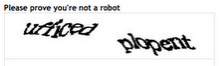 This very annoying box is probably active on your blog and annoying all of your guests that want to comment. Turn it off and make your visitors very happy.
Check (and Empty) Your Blogger Spam Folder
Once you know how to disable Word Verification for comments to your blog, a few Spam comments will trickle in from time to time. It’s important to know how to check the Spam folder in Blogger for comments that were misidentified as Spam and to delete any unwanted messages.

So, you’re a new blogger and you received your first award, but you don’t know how to share it! The process is easier than you might expect.
Install New Fonts to Your Computer
 Do you drool over all the great fonts other people use to create their products? It’s easy to find and install new fonts. This post includes separate instructions for Windows and Mac users.